
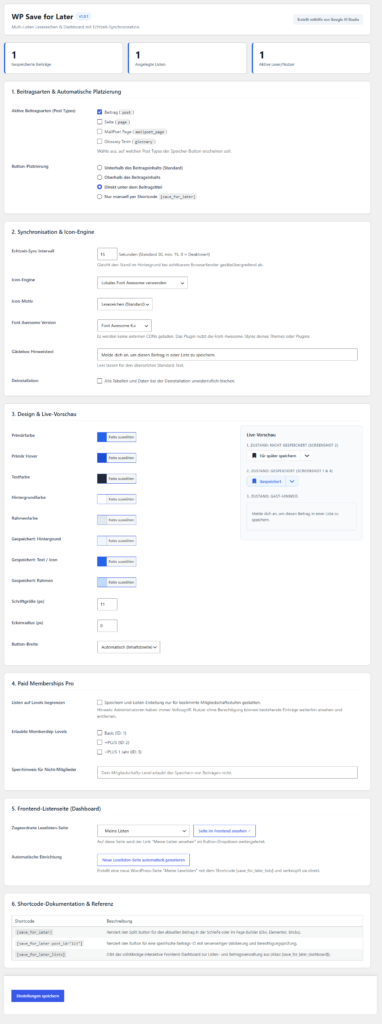


WP Save for Later is a lightweight, ultra-performant bookmark and reading list solution for WordPress. Users can save posts to their favorites with a single click using a modern split button or flexibly organize them into multiple lists. An interactive frontend dashboard allows managing, reordering, renaming, and filtering saved content—without page reloads and with full real-time synchronization across all devices.
Created using Google AI Studio.
You can download Version 1.0.2 (October 14th 2026) for free here.
Requires at least: 6.3
Tested up to: 7.1.3
Requires PHP: 8.0
Stable tag: 1.0.2
License: GPLv2 or later
License URI: https://www.gnu.org/licenses/gpl-2.0.html
Key Features
- Real-time Synchronization & Cache Safety: Complete independence from full-page caches (LiteSpeed Cache, WP Rocket, Cloudflare) and persistent object caches (Redis, Memcached, SQLite Object Cache). The HTML delivers neutral skeletons; the user-specific state is dynamically hydrated via authoritative REST API and no-cache headers.
- Modern Split-Button UI:
- Not saved: Clicking saves directly to the default list ("My Favorites").
- Saved: Clicking removes the post from all lists with an "Undo" toast.
- Dropdown: Direct selection of any list, inline creation of new lists, and quick access to the dashboard.
- Frontend Dashboard
[save_for_later_lists]:- Responsive sidebar with lists, counters, and new creation.
- "All saved posts" overview.
- Rename and delete lists (with an accessible confirmation dialog; posts remain untouched).
- Sort posts via drag & drop or keyboard arrows, move them to other lists, or remove them.
- Sort by Manual, Last Saved, and Title A–Z.
- Paid Memberships Pro (PMP) Integration:
- Access to list creation and saving can be restricted to specific membership levels.
- Server-side hardened: Viewing and removing existing entries remains available for authorized accounts.
- Font Awesome & SVG:
- Native, performant inline SVGs by default (no external requests, 0 CDN dependency).
- Optional: Detection and usage of local Font Awesome libraries (FA4, FA5, FA6) with automatic SVG fallback.
- Accessibility & Standards:
- WCAG 2.2 AA compliant (
aria-expanded,aria-live, keyboard navigation, visible focus rings, contrasts). - 100% PHP 8.0–8.4 compatible, strict
$wpdbpreparation, IDOR protection, GDPR export & deletion routines.
- WCAG 2.2 AA compliant (
== Installation ==
- Upload the
wp-save-for-laterfolder to the/wp-content/plugins/directory or install the ZIP file via the WordPress backend (Plugins → Add New → Upload Plugin). - Activate the plugin through the Plugins menu.
- Go to Settings → WP Save for Later to configure post types, automatic button placement, colors, and the reading list dashboard.
- Place the shortcode
[save_for_later_lists]on any page or use the "Automatically generate new reading list page" button in the settings.
== Frequently Asked Questions ==
= How does the plugin behave with LiteSpeed Cache? = WP Save for Later is optimized from the ground up for LiteSpeed Cache. All API and AJAX requests send X-LiteSpeed-Cache-Control: no-cache and trigger the litespeed_control_set_nocache hook. The JavaScript initializes seamlessly even when "Delay JS" or "Combine JS" is active.
Important for LiteSpeed UCSS / Critical CSS: If you have UCSS (Unique CSS) or Critical CSS enabled in LiteSpeed Cache, add the CSS class prefix .sfl-* under Page Optimization → Tuning → UCSS Whitelist in the LiteSpeed Cache settings so that interactive dropdowns, dialogs, and toasts are always styled correctly.
= Are data stored in the persistent object cache (Redis, SQLite)? = No. All user data, associations, and synchronization tokens reside exclusively in specially optimized database tables (wp_sfl_lists, wp_sfl_items, wp_sfl_state) and are managed via direct $wpdb queries. Therefore, stale cache states do not occur.
= Can I use the plugin with Paid Memberships Pro? = Yes. Under Settings → WP Save for Later, you will find a dedicated PMP section (if PMP is active). You can restrict bookmark creation and adding to selected membership levels.
= Does the plugin work with page builders like Divi, Elementor, or Bricks? = Yes. The shortcodes [save_for_later] and [save_for_later_lists] work in all page builders. Divi 5.x is fully supported without affecting the Visual Builder.
= Which shortcodes are available? =
[save_for_later]– Outputs the save button for the current post.[save_for_later post_id="123"]– Outputs the save button for a specific post.[save_for_later_lists](Alias:[save_for_later_dashboard]) – Outputs the full list dashboard.
== Changelog ==
= 1.0.2 =
- Fixed: Fixed a TypeError in
SFL_Display::filter_divi_module()(Divi passes the module element object as the third parameter;accepted_argswas adjusted to 2 and the type checking was relaxed).
= 1.0.1 =
- Fixed: Reliable button placement "Directly under post title" for Divi 5, Theme Builder, and themes with separate title templates. Placement directly after reading time notices.
- Fixed: Missing admin menu icon in the backend replaced with a native, crystal-clear base64 SVG bookmark icon.
- Optimized: Registration of stylesheets and inline CSS variables already in the header (
wp_enqueue_scripts).
= 1.0.0 =
- Initial release of WP Save for Later Pro.
- Custom database tables for unlimited, scalable lists.
- Split button with dropdown, toast notification with undo function.
- Fully functional frontend dashboard with drag-and-drop sorting and inline renaming.
- LiteSpeed Cache and Object Cache hardening.
- Paid Memberships Pro integration.
- GDPR data export and personal data deletion feature.
- Multilingualism (de_DE, de_DE_formal, en_US, en_GB).
Leave a Reply